This report documents the design and implementation of two complementary, scalable automation systems built on Google Sheets and Google Apps Script. Both systems eliminate manual, repetitive workflows that previously consumed significant operational resources while introducing the risk of human error and missed deadlines.
System 1: Payment Reminder Automation transforms inconsistent, manually-driven invoice follow-ups into a fully automated, rule-based process that detects overdue payments, sends contextually-appropriate reminders on a 72-hour cadence, and escalates communication based on payment age.
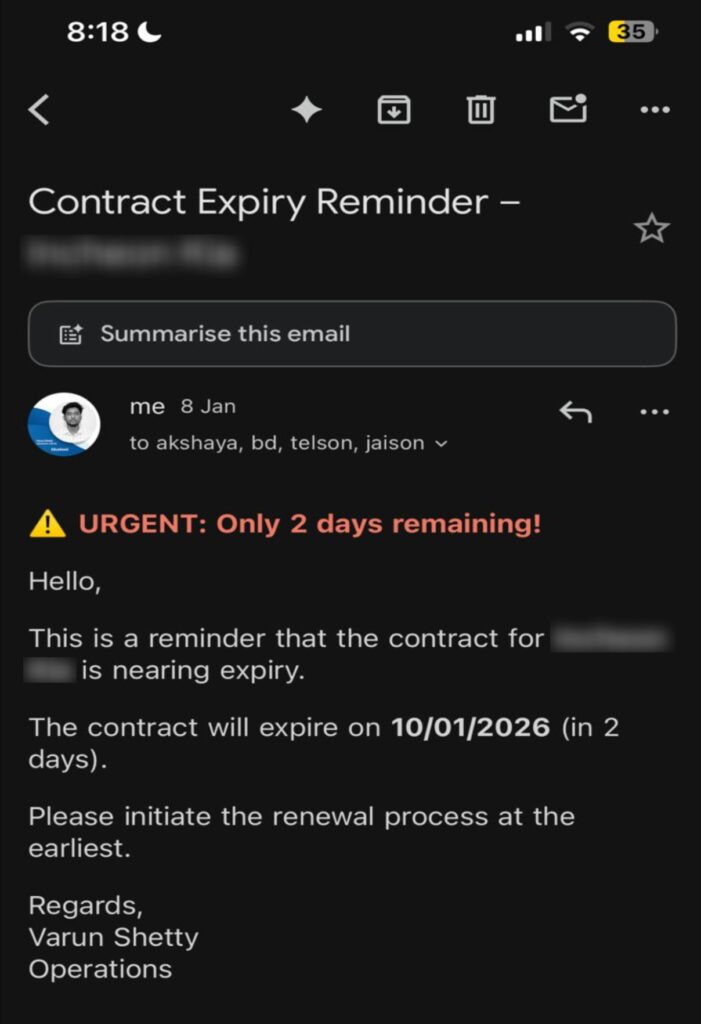
System 2: Contract Expiry Reminder Automation replaces weekly manual spreadsheet reviews and calendar reminders with an intelligent system that monitors all contracts, automatically notifies stakeholders within 30 days of expiry, and adjusts urgency indicators dynamically.
Together, these systems deliver measurable time savings, eliminate operational blind spots, and scale effortlessly as invoice and contract volumes grow.
Problem Statement
Payment Reminder Challenges (Before Automation)
Before automation, payment reminder workflows were entirely manual, inconsistent, and error-prone:
- Teams manually reviewed spreadsheets to identify overdue invoices
- Follow-up emails were drafted individually for each client
- No fixed reminder cadence—follow-ups depended on personal discipline and availability
- Missed reminders during busy periods or team unavailability
- No centralized tracking of how many reminders had already been sent
- Invoice attachments were manually downloaded and reattached each time
This approach resulted in delayed collections, inconsistent client communication, avoidable operational overhead, and unpredictable scalability challenges as invoice volume increased.
Contract Expiry Challenges (Before Automation)
Contract expiry tracking was entirely manual and reactive:
- Weekly spreadsheet reviews required to identify upcoming expiries
- Calendar reminders had to be set individually for each contract
- Email drafting was repetitive and time-consuming for every client
- Human oversight gaps meant contracts occasionally expired without proper notice
- Inconsistent follow-up—reminder timing varied based on who was monitoring and their availability
This created approximately 5–10 minutes of weekly work (4–6 hours annually) with significant risk of missed deadlines during busy periods or staff absences.
Solution Overview
Both systems were implemented as Google Sheets–driven automations using Google Apps Script, transforming manual processes into fully automated, rule-based systems that operate with zero human intervention.
Payment Reminder Automation
The solution detects overdue invoices, sends reminders at controlled intervals, escalates tone automatically, attaches relevant invoice PDFs, tracks reminder history persistently, and cleans up tracking when invoices are paid.
Contract Expiry Reminder Automation
The solution monitors all contracts continuously, identifies those within 30 days of expiry, sends automatically formatted email alerts to relevant stakeholders, escalates urgency indicators based on days remaining, and maintains a complete audit trail of all notifications.
AI / Automation Tools Used
Both systems leverage the following core technologies:
Google Apps Script
- Core automation engine that reads sheet data, calculates time-based triggers, and controls communication frequency
- Sends emails with attachments, logs action history, and validates data integrity
- Runs on automated schedules: every 12 hours for payment follow-ups and daily for contract tracking
Google Sheets
Acts as the single source of truth for all data.
For payments:
- Client names
- Invoice numbers and due dates
- Payment status
- Email recipients and CC stakeholders
- Drive links for invoice PDFs
For contracts:
- Client names
- Contract expiry dates
- Email recipients and CC lists
Automation Logic
Payment Reminder System
The script executes automatically every 12 hours and follows this logic:
- Reads all invoice rows from the sheet
- Filters for invoices with Status = Pending and valid client email addresses
- Calculates days overdue using the due date
- Checks if 72 hours have passed since the last reminder (preventing over-communication)
- Sends reminder email based on overdue window:
- 1–10 days overdue → Standard overdue notice
- 15+ days overdue → Final escalation notice
- Attaches one or multiple PDFs from Google Drive as specified
- Updates reminder history with timestamp and count
- Removes tracking when invoices are no longer pending
Contract Expiry System
The script executes daily and follows this logic:
- Reads all contract rows from the sheet
- Calculates days until expiry for each contract
- Identifies contracts within 30 days of expiry
- Applies intelligent urgency escalation:
- 7 days or less → Urgent (red)
- 8–14 days → Warning (orange)
- 15–30 days → Standard (standard formatting)
- Sends formatted email alerts to specified recipients and CC stakeholders
- Logs all notifications for audit trails
- Supports comma-separated email lists for multi-stakeholder notifications
Measurable Outcomes & Key Performance Indicators
| KPI | Before Automation | After Automation |
| Manual follow-up time (Payments) | 1–2 hrs/month | 0 minutes |
| Reminder consistency | Inconsistent | 100% automated |
| Missed follow-ups | Occasional | Zero |
| Email drafting effort | Repetitive | Fully automated |
| Invoice attachment handling | Manual | Automatic |
| Weekly monitoring time (Contracts) | 5–10 minutes | 0 minutes |
| Annual time investment (Contracts) | 4–6 hours | ~15 minutes (setup/maintenance only) |
| Scalability | Limited by staff | Unlimited |
Innovation & Scalability Features
Payment System Specific Results
- Eliminated manual payment follow-ups by removing repetitive invoice checks and individual reminder emails previously handled by operations or finance teams
- 72-hour intelligent reminder cadence ensures overdue invoices automatically receive reminders every 72 hours without spamming clients
- Zero-miss overdue tracking evaluates and follows up on every Pending and overdue invoice without human intervention
- Context-aware communication dynamically adjusts email tone, subject line, and urgency based on days overdue and reminder count
- Reduced revenue leakage risk through consistent escalation that surfaces overdue payments early
- Operations time savings achieved by removing recurring manual follow-ups, estimated at 1–2 hours per month per operator
Contract System Specific Results
- Eliminated manual contract monitoring that previously relied on daily spreadsheet checks and calendar reminders across teams
- Zero-miss guarantee where every contract within 30 days of expiry triggers an automatic reminder without human oversight
- Proactive renewal management delivers timely, formatted email alerts with urgency indicators based on days remaining
- Reduced contract lapses by ensuring renewal discussions begin early through automated escalation
- Freed up operations time by removing weekly manual checks, saving an estimated 4–6 hours annually
Payment Reminder System
- Controlled reminder throttling – prevents over-communication using a strict 72-hour interval check, balancing client communication with timely follow-ups
- Dynamic escalation logic – email subjects and messaging change automatically based on overdue severity, from standard notices to final escalation
- Persistent state tracking – reminder count and timestamps stored securely outside the spreadsheet, maintaining a complete audit trail
- Multi-PDF support – comma-separated Drive links allow attaching multiple documents per invoice without any manual effort
- Robust validation – skips incomplete rows, invalid links, unsupported file types, and non-overdue invoices, ensuring only appropriate communications are sent
Contract Expiry System
- Intelligent urgency escalation – emails automatically highlight critical timelines with visual and textual indicators (7 days = urgent red, 14 days = warning orange, 30 days = standard)
- Zero-touch operation – once configured, the system runs indefinitely without any manual intervention or monitoring
- Built-in validation – skips incomplete rows, handles date format variations, logs all decisions for audit trails
- Flexible CC distribution – supports comma-separated email lists for multi-stakeholder notifications
- Easy expansion – adding new contracts requires only a new row in the sheet with no code changes needed
Shared Innovation Attributes
Both systems demonstrate:
- Scalability without performance degradation – supports unlimited invoices, contracts, clients, CC stakeholders, and PDF attachments
- Minimal configuration overhead – setup takes minutes; adding new entries requires only spreadsheet rows
- Transparent decision logging – all actions are logged for compliance and audit purposes
- Reliable scheduling – uses Apps Script triggers for consistent, predictable execution
Replicability & Adaptability
Both systems are fully replicable across organizations and industries with minimal customization.
Payment Reminder System Adaptability
The system can be adapted for:
- Client invoices (primary use case)
- Vendor payments
- Subscription renewals
- Milestone-based billing
- Retainer follow-ups
Easily configurable for:
- Different reminder intervals (24h, 48h, weekly, custom)
- Different escalation thresholds
- Multiple departments (Finance, Sales Ops, Accounts Receivable)
- Custom email templates and tone adjustments
Contract Expiry System Adaptability
The system works for:
- Any contract type – employment, vendor, service, licensing, leasing
- Any notification cadence – easily adjustable from 30 days to any threshold (60, 90, 120 days)
- Multiple departments – separate sheets for HR, Legal, Finance, Operations
- Multi-language support through template modifications
Setup Requirements
Payment Reminder System
- Create a Google Sheet with the following columns:
- Client Name
- Invoice No
- Invoice Date
- Due Date
- Pending Amount
- Status (Paid/Pending)
- Email (client contact)
- CC (optional – comma-separated for multiple recipients)
- PDF (optional – supports multiple comma-separated Google Drive links)
- Navigate to Extensions → Apps Script in Google Sheets
- Paste the Payment Reminder automation code
- Run setupTrigger() once to activate automation
- System begins monitoring all pending invoices automatically
Contract Expiry System
- Copy the Google Sheet template with the following columns:
- Client Name
- Contract Expiry Date (in consistent date format)
- SID Email (primary contact)
- CC (optional – comma-separated email list)
- Navigate to Extensions → Apps Script in Google Sheets
- Paste the Contract Expiry automation code
- Run setupDailyTrigger() once to activate automation
- System immediately begins monitoring all contracts